Showing posts with label EFCodeFirst. Show all posts

Tuesday, 11 December 2012

LazyloadingEnable and ProxyCreationEnabled?


yes, lazyloadingEnable and ProxyCreationEnabled are by default true. yes using lazyloading should be true for referencing the reference tables.
so

            this.Configuration.LazyLoadingEnabled = true;
           this.Configuration.ProxyCreationEnabled = true;
           
both must be enabled true otherwise gives error. bydefault LazyLoadingEnabled is true because of all the related entities are loaded automatically.

           
   var t = context.emps.Find(4);
as well

if any case : 

  this.Configuration.ProxyCreationEnabled = false; 

                also we can load the relavent entities using 
   var t = context.emps.Find(4);
   context.Entry(t).Reference("Dept").Load();  // Proxy Creation
  or
  context.Entry(t).Reference(t=>t.Dept).Load(); // here Dept can't be a non-generic collection.


     var s  =context.emps.Local;
    context.emps.Add(new Employee { Ename = "rani", EPhone = "7478", EmpDept = 2 });
    context.SaveChanges();
             
using local properties we can able to track the changes at client when we add, delete, ...from a collection why because Local is Property which is of

ObservableCollection<TEntity> Local { get; }.


   var s  =context.emps.Local;  // Local return type is ObservableCollection. so we can easily track the changes of a collection at dynamically.

  context.emps.Add(new Employee { Ename = "rani", EPhone = "7478", EmpDept = 2 });  //1

               var  d = context.emps.FirstOrDefault(k => k.Ename == "narayan");
               d.Ename = "prasads";                                                //2
IEnumerable<DbEntityEntry<Employee>> change =context.ChangeTracker.Entries<Employee>();

               IEnumerator<DbEntityEntry<Employee>> ier = change.GetEnumerator();
               IEnumerable<string> currentval = new List<string>();
               IEnumerable<string> original = new List<string>();

               while (ier.MoveNext())
               {
                    currentval=ier.Current.CurrentValues.PropertyNames;
                    original=ier.Current.OriginalValues.PropertyNames;

               }

immediate window
change.count()
2
context.emps.Local[0]
{EFCodeFirstDemo.Employee}
    Dept: null
    Eid: 0
    EmpDept: 2
    Ename: "rani"
    EPhone: "7478"

Wednesday, 21 November 2012

How CodeFirst default LazyloadingEnable is true ?

Yes, using Include also we can retrive the relavent data using Navigation Property,but which excepts a navigation property. like


   public class Employee
    {
        [Key]
        public int Eid { get; set; }
        public string Ename { get; set; }
        public string EPhone { get; set; }
        public int EmpDept { get; set; }     
        public virtual Departments   Dept { get; set; }  // Navigation Property

    }
    public class Departments
    {
        [Key]
        public int Did { get; set; }
        public string DName { get; set; }   

    }
    public class Conn : DbContext
    {
        public DbSet<Employee> emps { get; set; }
        public DbSet<Departments> depts { get; set; }    
        protected override void OnModelCreating(DbModelBuilder modelBuilder)
        {

            modelBuilder.Entity<Employee>()
               .HasRequired(a => a.Dept)
               .WithMany()
               .HasForeignKey(u => u.EmpDept);
            base.OnModelCreating(modelBuilder);
        }
   
    }
then
-----
class Program
    {
        static void Main(string[] args)
        {
        Conn context = new Conn();
         Employee eobj = new Employee { Ename = "France", EPhone = "7176", EmpDept = 2 };
            context.emps.Add(eobj);
            context.SaveChanges();
        }
   }

thin Executed in DAtabase


Eid          Ename        EPhone                EmpDept             Did         DName
1              raju            7171                          1              1              Accounts
2              naveen        7172       2              2              Business
3              Chaitanya     7173          1              1              Accounts
4              Dinesh       7174       2              2              Business
5              Eswar     7175       3                3              DBA
6              France      7176       2                2              Business


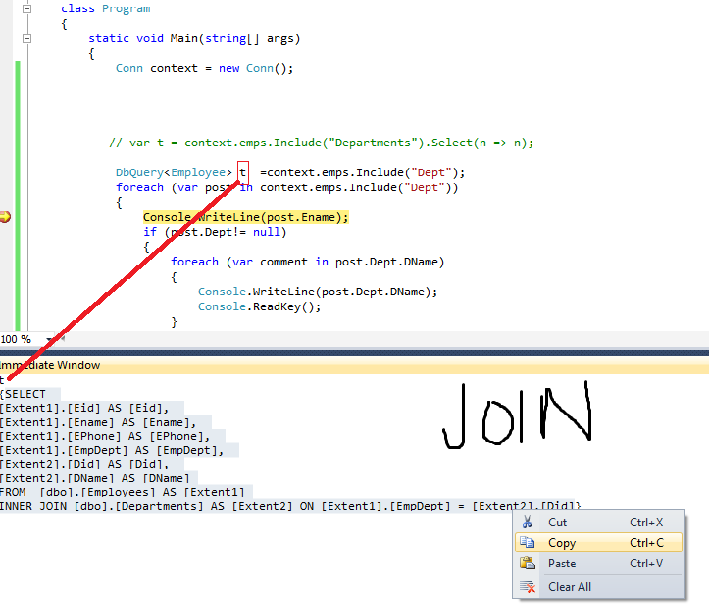
  IQueryable<Employee> 
t = context.emps.Include("Dept").Where(n => n.Ename == "raju").Select(n => n);

immediate window

t
SELECT 
[Extent1].[Eid] AS [Eid], 
[Extent1].[Ename] AS [Ename], 
[Extent1].[EPhone] AS [EPhone], 
[Extent1].[EmpDept] AS [EmpDept], 
[Extent2].[Did] AS [Did], 
[Extent2].[DName] AS [DName]
FROM  [dbo].[Employees] AS [Extent1]
INNER JOIN [dbo].[Departments] AS [Extent2] ON [Extent1].[EmpDept] = [Extent2].[Did]
WHERE N'raju' = [Extent1].[Ename]

Eid Ename EPhone EmpDept Did DName
1 raju 7171 1 1 Accounts
6 raju 7176 2 2 Business


emps------------> select * from emp

here where is department details?
so by default lazyloading is enabled but as per quering the data base only which returns now.
which will generates.


as well as

    public class Departments
    {
        [Key]
        public int Did { get; set; }
        public string DName { get; set; }
        public virtual ICollection<Employee> DeptEmployees { get; set; }


    }


now we can insert multiple employee records
as well as
we can retrive multiple employee records also. as a collections

how to insert multiple records:

   Employee emp = new Employee { Ename = "narayanarao", EPhone = "7175" };
                Employee emp1=new Employee{ Ename="shekar", EPhone="7176"};
                List<Employee> elist=new List<Employee>();
                elist.Add(emp);
                elist.Add(emp1);
                Departments d = new Departments { DeptEmployees = elist, DName="Professionals" };

                context.depts.Add(d);
                context.SaveChanges();

how to retrive particular dept records :

  var t = context.depts.Include("DeptEmployees");           //     DeptEmployees 
                foreach (var item in t)
                {
          ICollection<Employee> ems = item.DeptEmployees;  // grouped by department id
                    foreach (var items in ems)
                    {
                        Console.WriteLine(items.Ename);
                        Console.WriteLine(item.DName);

                    }

                }


Note:   DeptEmployees  column is  created at Employee table why because to this column referenceing the apporiate Employee.


Columns:


EmpDept----particular employee

Departments_Did-----collection of employees/ a particular dept employees

Monday, 19 November 2012

Code First: Queries, Stored Procedures

Yes, till now we created 2 POCO Classes(Employee,Departments) then we seen how to perform Crud Operations.
but now we will see How to Enable 

Using queries:

POCO Class is  Employee then but which is saved in database as Employees---> s is added to every  POCO class in Code First model

like : Employee--Employees, Dept---Depts....ect

DbSqlQuery<Employee> employees = context.emps.SqlQuery("SELECT * FROM dbo.Employees");//.ToList();

                foreach (Employee item in employees)
                {
                    Console.WriteLine(item.EPhone);
                   
                }

Using StoredProcedure:

ALTER PROCEDURE [dbo].[stp_InsertEmp]
(
      @Name as VARCHAR(50),
    @Phone as Varchar(50),
    @Eaddress as int

) AS
 begin
INSERT INTO dbo.Employees(EName,EPhone,Eaddress)VALUES(@Name,@Phone,@Eaddress)
end
                               ===============================
    public class Conn : DbContext
    {
            public DbSet<Employee> emps { get; set; }
            public DbSet<Departments>  dept{ get; set; }

         public void AddEmp(Employee emp)
        {
            SqlParameter[] pars=new SqlParameter[3];
            pars[0]=new SqlParameter("@Name",emp.Ename);
            pars[1]=new SqlParameter("@Phone", emp.EPhone);
            pars[2]=new SqlParameter("@Eaddress",emp.Eaddress);
        base.Database.ExecuteSqlCommand("exec stp_InsertEmp @Name,@Phone,@Eaddress", pars);
       
        }
 }
  Conn context = new Conn();
{
           
Employee eobj = new Employee { Dept = new Departments { DName = "Dept2" }, Ename = "James", EPhone = "7744", Eaddress = 1 };
         
            context.AddEmp(eobj);
            Console.WriteLine("Saved Succesully ...storedprocedure");
           
}
ALTER procedure [dbo].[SelectEmp]
@eids int
as
begin
select * from dbo.Employees where EId=@eids
end

using (Conn  context= new Conn())
 {
            
 IList<Employee> emplist;
              
      sqlParameter categoryParam = new SqlParameter("@eids",7);
emplist = context.Database.SqlQuery<Employee>("exec SelectEmp @eids", categoryParam).ToList();
                    foreach (Employee item in emplist)
                    {                       
                        Console.WriteLine(item.Ename);
                        Console.WriteLine(item.Eaddress);
                    }
                    Console.ReadKey();
                }

Ex :


 DbSet<Employee> t = context.emps;

                Employee e= t.Find(1);

immediate window:


e.EmpDept
1
e.Ename
"raju"
e.Dept.DName
"Accounts"


Ex:


Employee t = context.emps.Find(4);--------single record along with dept details


t
    Dept: {EFCodeFirstDemo.Departments}
    Eid: 4
    EmpDept: 2
    Ename: "Dinesh"
    EPhone: "7174"
t.Dept.DName
"Business"

How to Creating in-memory object(Employee --> t)  ?

using create() method

            Conn context = new Conn();
        
            Employee t = context.emps.Create();

            t.Ename = Console.ReadLine();
            t.EPhone = Console.ReadLine();
            t.EmpDept = Convert.ToInt32(Console.ReadLine());          
            context.emps.Add(t);
            context.SaveChanges();
                 

Friday, 16 November 2012

Code First mappings using Fluent API


yes, previously we uses EF-Code first classes then we mapping between the POCO classes in code-first model

but using Fluent -API automatics this connvation. which will minizes coding


public class Conn : DbContext
    {
        public DbSet<Employee> emps { get; set; }
        public DbSet<Departments>  dept{ get; set; }

        protected override void OnModelCreating(DbModelBuilder modelBuilder)
        {
               //  modelBuilder.Entity<Employee>()               //.HasRequired(a => a.Dept)
               //.WithMany()                   
               //.HasForeignKey(u => u.Eaddress);

            //modelBuilder.Entity<Employee>().
                              
           // base.OnModelCreating(modelBuilder);

            //      or

             
            modelBuilder.Conventions.Remove<PluralizingTableNameConvention>();
        }
    }


How to write Relationships in Code First?


Yes, Code First Entity Framewok supports relationships like Database First/Relational databases now

Entities :

public class Employee
    {
        [Key]
        public int Eid { get; set; }
        public string Ename { get; set; }
        public string EPhone { get; set; }
        public int Eaddress { get; set; }     
        public Departments Dept { get; set; }

    }
    public class Departments
    {
        [Key]
        public int Did { get; set; }
        public string DName { get; set; }

    }

Here:

Departments----PK table
Employee----Fk table
Primary keys are autogenerated if we send also those are ignored.
Eaddress(reference Departments)à is a reference key of Departments table.  as well we can specify the Department also at a time
Ex:
   Employee eobj = new Employee { Dept = new Departments { DName = "Accounts" },

            Ename = "raju", EPhone = "7171" };

            con.emps.Add(eobj);

            con.SaveChanges();


Eid          Ename  EPhone                Eaddress
1              raju        7171       1

Did         DName
1                     Accounts

Employee is automatically mapped to dept of 1
  Employee eobj = new Employee {  Eaddress=1, Ename = "raju1", EPhone = "7172" };

What is use of   public int Eaddress { get; set; }      in Employee ?

New employee -----belongs to existing Department.


Eid          Ename  EPhone                Eaddress
1              raju        7171       1
2              raju1      7172       1  // newly employee added to  existing department.
Did         DName
1                     Accounts
And
We can add new Department aswell new employee at a time.
    Employee eobj = new Employee { Dept = new Departments { DName = "Sales" }, Ename = "balu", EPhone = "4131" };

Eid          Ename  EPhone                Eaddress
1              raju        7171       1
2              raju1      7172       1
3              balu       4131       2
Belongs
Did         DName
1              Accounts
2              Sales
 how to specify keys in Code-First model:
             modelBuilder.Entity<Employee>()
               .HasRequired(a => a.Dept)
               .WithMany()                     --à type of relationship
               .HasForeignKey(u => u.Eaddress);

            //modelBuilder.Entity<Employee>().
                              
            base.OnModelCreating(modelBuilder);

NOTE: keep in mind -à data will be splicted as per columns and stored in their relavent tables.